“Unraveling The Angular Enigma: Navigating the Complexities with Clarity!”
Engineering

If you have ever used Angular before, then you may have wondered what goes on behind the scenes to render the application when you run the command ‘ng serve’.
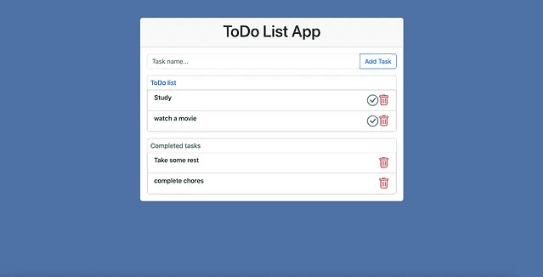
The Angular JavaScript framework, developed by Google, has gained considerable popularity for its ability to build responsive and dynamic web applications. Among the critical aspects of angular functionality is its ability to load and start applications, allowing developers to create sophisticated single-page applications (SPAs) easily. This article will explore how Angular loads and starts an application by building a simple to-do list application.
Understanding the basics
Let’s first establish a foundational understanding of Angular’s core components before diving in:
1. Modules: A module contains related components, services, and other features together.
2. Components: You can think of components as unit building blocks for Angular applications. They are responsible for rendering parts of the user interface and encapsulating the functionality of those UI elements.
3. Services: A service works like a central repository for storing business logic common to several components. A service performs a variety of functions, including retrieving data, communicating with APIs, and sharing data between components.
4. Directives: Directives are instructions usually placed on elements, given to the DOM to manipulate the appearance or behavior of elements. These include structural and attribute directives. Attribute directives only change the element they are added to, while structural directives affect the whole Document Object Model (DOM). I.e. elements get added or removed.
5. Templates: Templates define the structure of the component they belong to and contain placeholder elements for dynamic data.
6. Single Page Applications (SPAs): They are apps that render information in one page without requiring a page reload.
Understanding the Angular Application Initialization Process
Angular applications are single-page applications (SPAs) that run in a browser. The initialization process for Angular involves several distinct phases. Each phase is crucial to the success of your application.
1. Loading the HTML
When an angular application Is initially rendered by entering the application’s URL in the browser, an initial HTML file is served. This file contains an HTML element which is a reference to the entire application. This element points to the root component. This file usually contains a few essential elements, including a reference to the main JavaScript file (often named `main.js` or `main.ts`). This file is part of the scripts that are injected by the CLI automatically, even though they are not defined in the HTML file. This JavaScript file is where the magic begins.
2. Bootstrapping
Rendering the application using `ng serve’ builds the project and automatically adds the right imports to the index.html file. This process involves loading the core Angular modules and components needed to start the application. The `main.ts` file, which was referenced in the initial HTML, is responsible for this step. The main.ts file bootstraps AppModule which is usually the name of the root module of the application by calling:
platformBrowserDynamic().bootstrapModule(AppModule)
_catch(err => console.error(err));
The root module is usually defined in a separate file named app.module.ts
3. Module Loading
The root module mentioned earlier is an entry point for providing information about components, services and other modules that comprise the application. This module is loaded by angular during the build-up stage.
4. Component Rendering
After the module load phase, angular renders the components declared in the root module. These components consist of templates that define the organization and content of its view. Using these templates, Angular creates an initial view of the application.
5. Dependency Injection
A dependency is a class another class depends on. With Angular, you can manage the relationships between different components and services using its dependency injection system. During the initialization process, Angular uses dependency injection to provide components with the services they need.
6. Change Detection
Change detection in Angular monitors for changes in the application’s data continuously and updates the view accordingly. By doing so, the user interface is kept up-to-date with the underlying data, allowing it to provide a seamless and responsive user experience. Change detection is an important part of Angular’s initialization process and ensures that any modifications to the application’s state is reflected in the view.
Creating a To-do List App
To start with, follow these steps to install angular cli:
we need to install Node js from Node js official website
Use npm to install angular cli globally on your machine by entering this command in your terminal or command prompt application:
npm install -g @angular/cli
Verify installation by checking the version using the command:
ng version
Let’s take a deeper dive into angular by creating a to-do list application.
We start by creating the initial structure of the application. We do so by running the following command on the command line:
ng new to-do-list
This prompts you for information about the features you want to include in your application (I chose CSS and did not add angular routing) and sets up the necessary dependencies and packages for the project. Install bootstrap icons and bootstrap to your application.
In the to-do-list/src/styles.css, you can add global styles for your application. For example, for a global styling for the to-do list application, you can add the following:
/* You can add global styles to this file, and also import other style files */
html { background-color: #5072A7; }
index.html contains the app-root selector which displays the contents of the app component which is the root component of the application.
App module (to-do-list/src/app/app.module.ts) is the root module of the application and contains the declaration of components, imported modules, and other details.
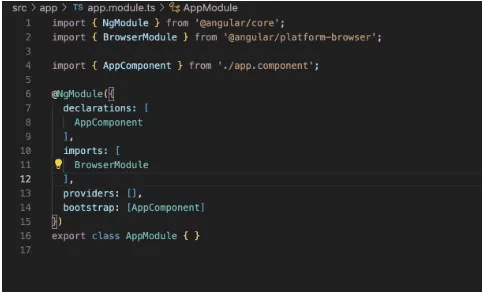
Here we can see two in-built modules in angular, BrowserModule makes it possible to run browser applications, while FormsModule provides functionalities necessary for creating template-driven forms.
A. Creating child components
The code for the to-do-list app can be found here. In the to-do-list/src/app/app.component.html, I have included the selector of the task-list component to load its contents. To create a child component, use
ng generate component task-list or
ng g c task-list for short.
This creates a component folder within the app folder. To create it within a specific folder within the app folder, navigate to that folder or run the command or use:
ng generate component task-list/task-item
B. where task-item component becomes a child component of task-list.
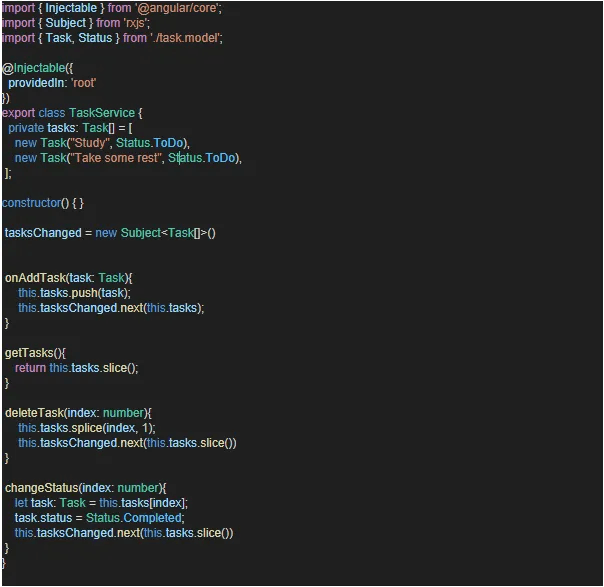
Taking a look at the task service
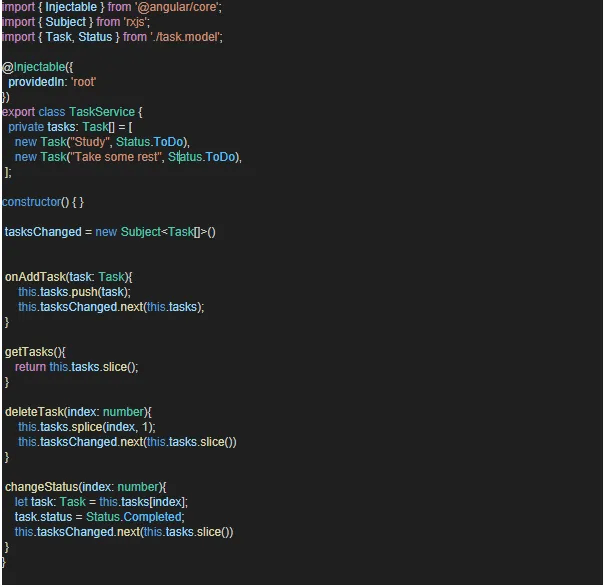
As mentioned earlier, a service is a repository for storing common logic in angular applications. They can be injected into components and other components to provide certain functions or features.
to-do-list/src/app/task-list/task.service.ts
The task model (to-do-list/src/app/task-list/task.model.ts) defines the structure of a task instance.
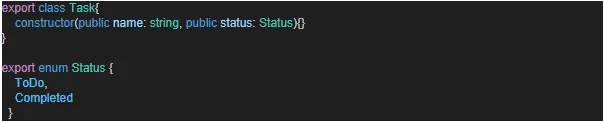
The task-list component
to-do-list/src/app/task-list/task-list.component.html

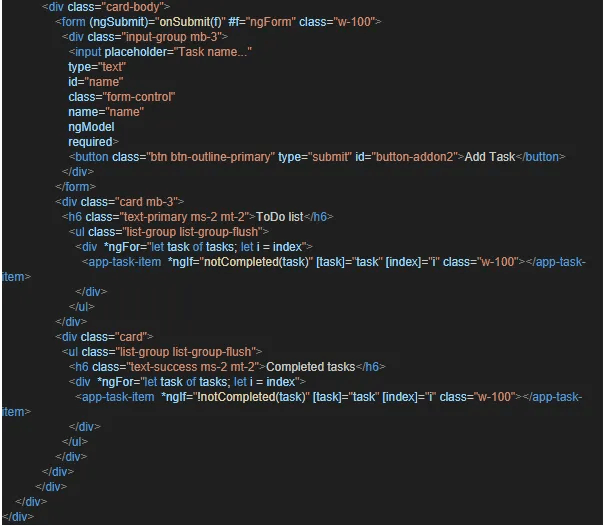
The task-list component includes two structures directives, *ngFor and *ngIf. These directives affect the whole DOM. *ngIf displays an element only if a condition is met while *ngFor iterates over a collection to dynamically create and display repeated sets of an html element.
to-do-list/src/app/task-list/task-list-component.ts
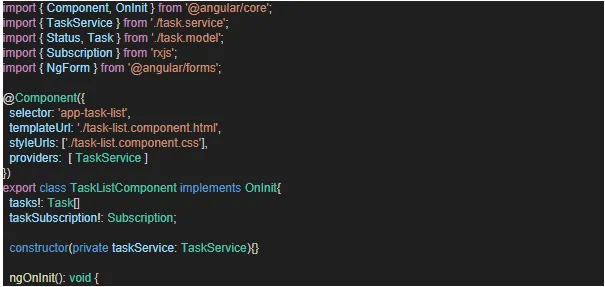
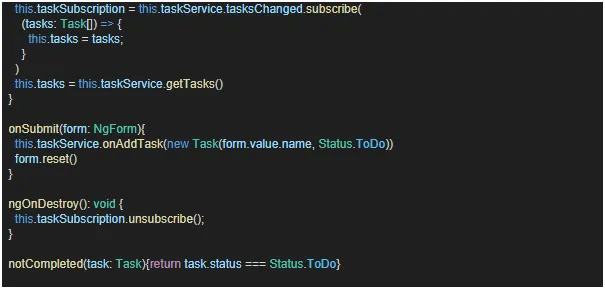

These contains methods that implements logic for the component’s template. ngOnInit is a lifecycle hook in angular and initializes tasks and data for the component. ngOnDestroy contains code that is executed just before the component is destroyed. In this instance, we have unsubscribed from an observable. Observables are used to handle asynchronous operations.
The task item component
to-do-list/src/app/task-list/task-item/task-item.component.ts
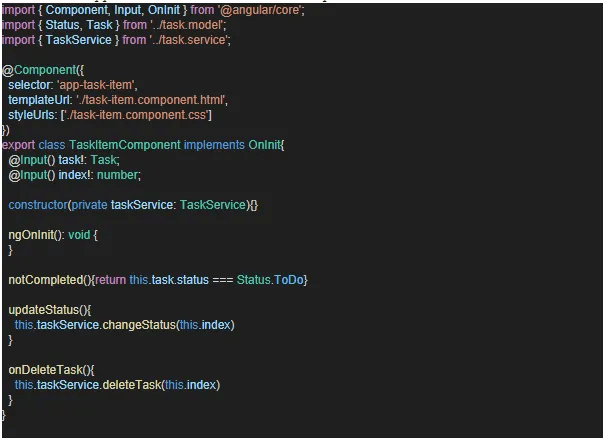
Here we see another construct @Input(). This is used to bind custom properties in the parent component to a property in the child component. This can be done by setting the value within the component’s selector in the parent component. See an example below:

Here the [task] property of the task-item component was bound to a task property in the task-list component which is a parent of the task-item component.
to-do-list/src/app/task-list/task-item/task-item.component.html
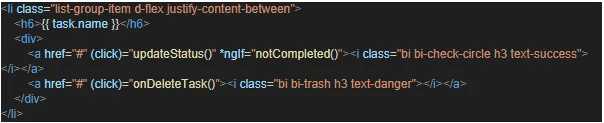
In this template we can also see the use of the click event listener in angular, here a function is executed when the said element has been clicked by a user.
Conclusion
Due to its well-defined initialization process, Angular can load and start applications efficiently. A series of carefully orchestrated steps is required to bring your application to life, including loading the initial HTML, bootstrapping modules, rendering components, and managing dependencies. Developers can gain a deeper understanding of how Angular handles the complexities of modern web applications by understanding the framework’s development process. To get the most out of Angular, regardless of whether you are a seasoned programmer or just getting started, you need to understand how it initializes applications.
Written by Joana Mamley Teye


